
Wellstar's top pages UX research report
Leveraging user behavior data to optimize core digital touchpoints and navigation.
Role
UX/UI Designer
Industry
SEO & Healthcare
Duration
Jan - Feb 2025
Project Context & Challenges
Stakeholder: Wellstar’s Dot Org teams requested an evaluation of top-visited pages to elevate visitors’ experiences across the Wellstar.org platform.
Core problem: High-traffic user paths—ranging from booking virtual appointments to maintaining patient records—suffered from engagement-stunting friction, unintuitive links, and visual layout dissimilarity.
Key constraints: Evaluating data within the boundaries of masked user privacy controls in FullStory while mapping UX recommendations directly onto existing components inside our Sitecore CMS framework.
Role & Goals
Business goal: Pinpoint and eliminate digital friction on core pages to increase user engagement, streamline navigation workflows, and provide cross-functional teams with an optimization blueprint.
My role: Product Designer responsible for user behavior analysis, task analysis, benchmark testing, accessibility evaluation, and component-impact documentation.
User win: A seamless, intuitive browsing experience where key interactive elements are easy to target and layouts support quick, confident actions.

Prioritization & Alignment
Cross-Functional Collaboration: Partnered with designers, SEO analysts, and support analysts during the first week to identify top-visited pages and align on primary target experiences.
Framework Preparation: Focused early efforts on building a structured, centralized FigJam workspace to organize raw data, annotations, screen grabs, and insights streams into a single source of truth.
Usability Bug Reviews: Structured a dedicated handoff audit mapping recommended UX improvements directly to the corresponding Sitecore CMS components, supplying references and snippets to jumpstart the experience editor updates.
Solution & Designs
Match Between System & Real World: Updated layout relationships by swapping the positioning of passive description paragraphs with highly interactive elements (like addresses and phone numbers) to let users act immediately without informational overload.
User Control & Freedom: Redesigned unintuitive link behaviors—such as the Kennestone hospital page service links—to utilize fixed scroll positioning or horizontal-scroll carousels, keeping the user in control of their view.
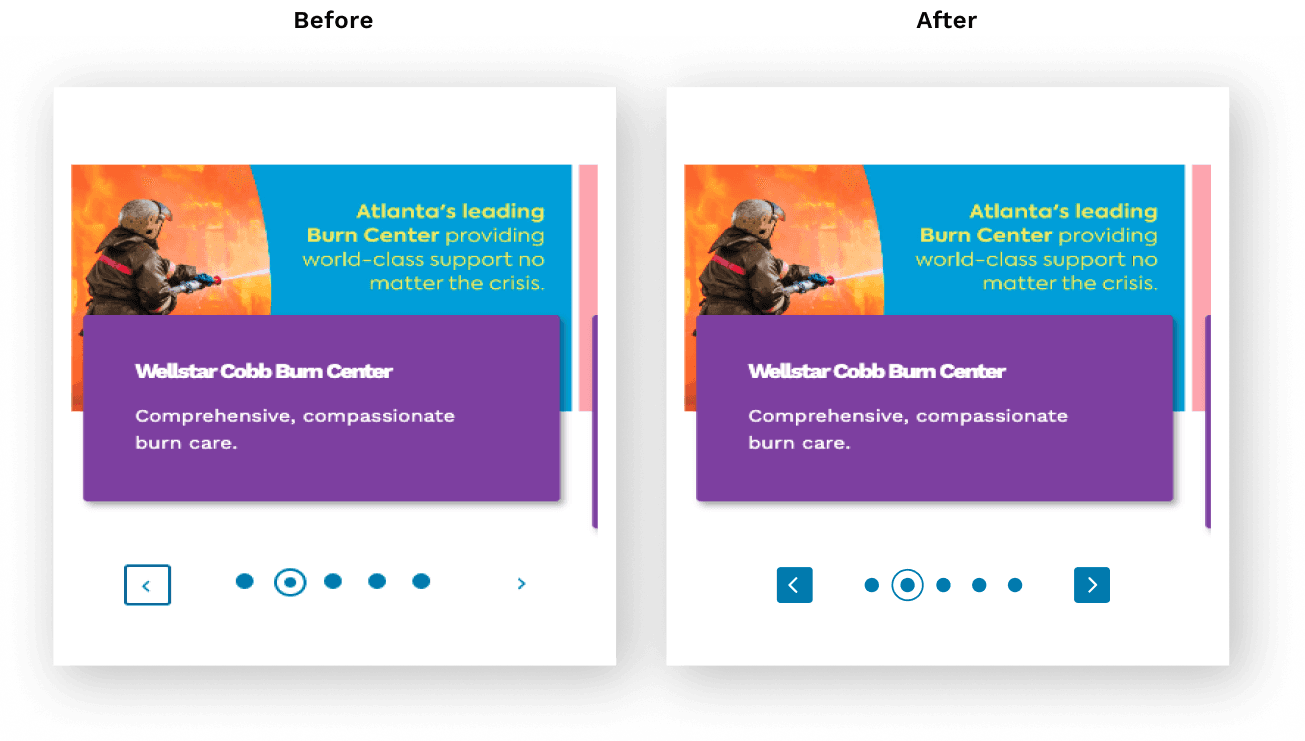
Fitt’s Law & Layout Stability: Addressed accessibility barriers on UI controls by enlarging small interactive targets (like carousel chevron arrows) and establishing fixed parent heights to prevent pagination elements from shifting during use.


Outcomes
Centralized FigJam Insights Board: Delivered a comprehensive readout board containing data-driven user experience friction points, visual annotations, and clear recommendations for high-traffic layouts.
Sitecore Component Mapping: Provided a clear documentation ledger linking recommended design changes directly to impacted Sitecore CMS components, bridging the gap between design research and engineering execution.
Optimized Visual Hierarchy: Standardized drop-down layout behaviors to ensure clear visual boundaries between sub-menus and parent elements, strengthening the association between user actions and displayed information.
Wellstar's top pages UX research report
Leveraging user behavior data to optimize core digital touchpoints and navigation.
Role
UX/UI Designer
Industry
SEO & Healthcare
Duration
Jan - Feb 2025
Project Context & Challenges
Stakeholder: Wellstar’s Dot Org teams requested an evaluation of top-visited pages to elevate visitors’ experiences across the Wellstar.org platform.
Core problem: High-traffic user paths—ranging from booking virtual appointments to maintaining patient records—suffered from engagement-stunting friction, unintuitive links, and visual layout dissimilarity.
Key constraints: Evaluating data within the boundaries of masked user privacy controls in FullStory while mapping UX recommendations directly onto existing components inside our Sitecore CMS framework.
Role & Goals
Business goal: Pinpoint and eliminate digital friction on core pages to increase user engagement, streamline navigation workflows, and provide cross-functional teams with an optimization blueprint.
My role: Product Designer responsible for user behavior analysis, task analysis, benchmark testing, accessibility evaluation, and component-impact documentation.
User win: A seamless, intuitive browsing experience where key interactive elements are easy to target and layouts support quick, confident actions.
Prioritization & Alignment
Cross-Functional Collaboration: Partnered with designers, SEO analysts, and support analysts during the first week to identify top-visited pages and align on primary target experiences.
Framework Preparation: Focused early efforts on building a structured, centralized FigJam workspace to organize raw data, annotations, screen grabs, and insights streams into a single source of truth.
Usability Bug Reviews: Structured a dedicated handoff audit mapping recommended UX improvements directly to the corresponding Sitecore CMS components, supplying references and snippets to jumpstart the experience editor updates.
Solution & Designs
Match Between System & Real World: Updated layout relationships by swapping the positioning of passive description paragraphs with highly interactive elements (like addresses and phone numbers) to let users act immediately without informational overload.
User Control & Freedom: Redesigned unintuitive link behaviors—such as the Kennestone hospital page service links—to utilize fixed scroll positioning or horizontal-scroll carousels, keeping the user in control of their view.
Fitt’s Law & Layout Stability: Addressed accessibility barriers on UI controls by enlarging small interactive targets (like carousel chevron arrows) and establishing fixed parent heights to prevent pagination elements from shifting during use.
Outcomes
Centralized FigJam Insights Board: Delivered a comprehensive readout board containing data-driven user experience friction points, visual annotations, and clear recommendations for high-traffic layouts.
Sitecore Component Mapping: Provided a clear documentation ledger linking recommended design changes directly to impacted Sitecore CMS components, bridging the gap between design research and engineering execution.
Optimized Visual Hierarchy: Standardized drop-down layout behaviors to ensure clear visual boundaries between sub-menus and parent elements, strengthening the association between user actions and displayed information.
Wellstar's top pages UX research report
Leveraging user behavior data to optimize core digital touchpoints and navigation.
Role
UX/UI Designer
Industry
SEO & Healthcare
Duration
Jan - Feb 2025
Project Context & Challenges
Stakeholder: Wellstar’s Dot Org teams requested an evaluation of top-visited pages to elevate visitors’ experiences across the Wellstar.org platform.
Core problem: High-traffic user paths—ranging from booking virtual appointments to maintaining patient records—suffered from engagement-stunting friction, unintuitive links, and visual layout dissimilarity.
Key constraints: Evaluating data within the boundaries of masked user privacy controls in FullStory while mapping UX recommendations directly onto existing components inside our Sitecore CMS framework.
Role & Goals
Business goal: Pinpoint and eliminate digital friction on core pages to increase user engagement, streamline navigation workflows, and provide cross-functional teams with an optimization blueprint.
My role: Product Designer responsible for user behavior analysis, task analysis, benchmark testing, accessibility evaluation, and component-impact documentation.
User win: A seamless, intuitive browsing experience where key interactive elements are easy to target and layouts support quick, confident actions.
Prioritization & Alignment
Cross-Functional Collaboration: Partnered with designers, SEO analysts, and support analysts during the first week to identify top-visited pages and align on primary target experiences.
Framework Preparation: Focused early efforts on building a structured, centralized FigJam workspace to organize raw data, annotations, screen grabs, and insights streams into a single source of truth.
Usability Bug Reviews: Structured a dedicated handoff audit mapping recommended UX improvements directly to the corresponding Sitecore CMS components, supplying references and snippets to jumpstart the experience editor updates.
Solution & Designs
Match Between System & Real World: Updated layout relationships by swapping the positioning of passive description paragraphs with highly interactive elements (like addresses and phone numbers) to let users act immediately without informational overload.
User Control & Freedom: Redesigned unintuitive link behaviors—such as the Kennestone hospital page service links—to utilize fixed scroll positioning or horizontal-scroll carousels, keeping the user in control of their view.
Fitt’s Law & Layout Stability: Addressed accessibility barriers on UI controls by enlarging small interactive targets (like carousel chevron arrows) and establishing fixed parent heights to prevent pagination elements from shifting during use.
Outcomes
Centralized FigJam Insights Board: Delivered a comprehensive readout board containing data-driven user experience friction points, visual annotations, and clear recommendations for high-traffic layouts.
Sitecore Component Mapping: Provided a clear documentation ledger linking recommended design changes directly to impacted Sitecore CMS components, bridging the gap between design research and engineering execution.
Optimized Visual Hierarchy: Standardized drop-down layout behaviors to ensure clear visual boundaries between sub-menus and parent elements, strengthening the association between user actions and displayed information.

Interested in connecting?
Nothing beats a real, human connection. Reach out and get to know me better!
Interested in connecting?
Nothing beats a real, human connection. Reach out and get to know me better!
Interested in connecting?
Nothing beats a real, human connection. Reach out and get to know me better!
Copyright 2026 by John Mark Carter
Copyright 2026 by John Mark Carter
Copyright 2026 by John Mark Carter